TL;DR
A custom 404 page tells visitors plainly that the page isn’t here and offers a way on: home, the main navigation, a few top pages and a way to report the link. The server must still send status 404 with it. Test that with a made-up address on your site, not /404, in your browser and with a link checker.
We make a link checker: LinkScan – Broken Link Checker, an extension for Chrome. It reads the status code a link returns; it does not check your server’s configuration.
What a 404 page is for
A 404 status says the server found nothing at that address, and doesn’t say for how long. A 410 says the page is gone, likely for good (RFC 9110, §§ 15.5.5 and 15.5.11, the HTTP standard, June 2022).
The status is for browsers and search engines. When a URL answers 404, Google drops it from its index if it was indexed and crawls it less often (Google’s status code documentation, updated February 2026). That is right for an address that shouldn’t exist, and Google says 404s on such URLs don’t hurt the rest of your site (Search Console Help).
The page is for people: someone followed a link or typed an address and got nothing. The 404 page is your chance to keep them.
Help the visitor
Say plainly that the page isn’t there, and why. A heading such as “Page not found”, then one line on the likely cause: a mistyped address, an old link, a page that moved or was removed. The U.S. Web Design System’s 404 template (USWDS, updated March 2023) asks for that line and says “Don’t make the error code a prominent part of the page”. The GOV.UK Design System uses the H1 “Page not found” and rules out jargon such as “404”. Jakob Nielsen asked for “a simple and slightly apologetic statement” (NN/g, 1998-06-14). After a relaunch, say so: “Our website has changed and some older links no longer work” (from the case study) tells visitors the content may live at a new address and the fault isn’t theirs. To see which old links still reach your 404 page and where they come from, see old links visitors still follow.
One search option, labelled. USWDS: “Only include a search option on the error page if there isn’t already a search box in the site’s header or anywhere else on the page.” It can be a field or a button that opens the site’s search. A field needs a label, which may be visually hidden, or an aria-label (W3C WAI, updated May 2024); a button needs an accessible name.
Links to top tasks. Give visitors a way out of the dead end: USWDS lists the homepage, a contact page and search; Nielsen adds links to close matches. Add a few links to where most visitors go, each with a short description, as the case study does.
A way to report the broken link. USWDS suggests telling visitors how to report a problem. Link a contact page, and ask for the address and where they found it.
Keep the site header and footer. “The error page should look like your website,” says USWDS, and “Include the main navigation.” GOV.UK adds: no breadcrumbs.
No blame, and no dead-end jokes. Write “We’re sorry, that page can’t be found”, not “Whoops, you made a mistake” (USWDS, which also says “Avoid funny, cutesy, or whimsical”). GOV.UK rules out “oops” and blaming the user; NN/g’s error-message guidelines (updated May 2023) add that humour can become stale. MDN calls custom design “a good thing in moderation”. For design inspiration and recovery ideas, see 404 page examples.
Accessible headings and labels. A unique <title> such as “Page not found – Site name”, which screen readers announce first (USWDS, WCAG 2.4.2), one H1, and headings and labels that “describe topic or purpose” (WCAG 2.2, SC 2.4.6). Don’t signal the error by colour alone: GOV.UK avoids red text.
Always a real 404 status. However good the page, it must answer 404 or 410. A “not found” page sent with 200 is a soft 404 (Google). See the mistakes that cause one and how to check it.
Mistakes
These setups show a nice 404 page to people but tell browsers and search engines the page is fine.
- The page is sent with status 200. Search Console reports a soft 404 when a page “returns a user-friendly ‘not found’ message but not a 404 HTTP response code” (Page indexing report help). For what a soft 404 is, see 404 vs soft 404.
- Every missing URL redirects to the home page. Google’s advice is plain: “Don’t create fake content, redirect to your homepage, or use robots.txt to block 404s” (Search Console Help). The visitor also loses the context of what they were looking for. Redirect with a 301 only when a real replacement exists. Try a soft 404 by redirect.
- Apache’s
ErrorDocumentpoints to a full URL. With anything likehttp://in front, Apache sends a redirect, so “the client will not receive the original error status code” (Apache docs). - Nginx’s
error_pagepoints to a full URL, or changes the code. A full URL returns 302 by default, anderror_page 404 =200 …replaces the 404 with a 200 (nginx docs). - A single-page app answers every path with its shell. A catch-all route serves
index.htmlwith status 200 for any address, and the app then draws a “not found” view. The server never says 404.
Set it up
Each platform has one place for the 404 page. Use a local path, so the server serves the page in place and keeps the 404.
WordPress. In a classic theme, WordPress looks for 404.php in your theme, then falls back to index.php (template hierarchy). Add a 404.php to your theme, or to a child theme if the theme isn’t yours, and keep the theme’s header and footer in it.
Netlify and other static hosts. Put a 404.html at the top of the published folder. Netlify says it is “picked up and displayed automatically for any failed paths”, with no redirect rule needed (redirect options). If you add a catch-all rewrite for a single-page app, such as /* /index.html 200, check a made-up path afterwards: our reading of Netlify’s rules is that the rewrite answers instead of the 404 page.
GitHub Pages. Add 404.html, or 404.md, to the publishing source of your site. A Markdown file starts with this front matter (GitHub docs):
---
permalink: /404.html
---
Apache. In the server config or .htaccess, point ErrorDocument to a local path, never a full URL (Apache docs):
ErrorDocument 404 /404.htmlNginx. In the server block, use a local URI. Nginx serves it as an internal redirect and keeps the 404, as long as there is no =200 and no full URL (nginx docs):
error_page 404 /404.html;Single-page apps. The server can’t know which routes exist, so the app has to tell search engines. Google gives two options (JavaScript SEO basics, updated March 2026): a JavaScript redirect to a URL for which the server answers 404, such as /not-found, or a <meta name="robots" content="noindex"> added to the error view with JavaScript. The first keeps a real 404; the second only keeps the page out of the index.
To have an AI agent (Claude Code, Cursor, ChatGPT and so on) build or improve your 404 page, fill in the brackets and give it this prompt.
Site: [YOUR SITE URL] on [PLATFORM].

Goal: a 404 page that offers a way on and returns a real 404 status.

- Missing URLs answer 404, never 200 (a soft 404) or a redirect home. Apache or Nginx: a local path, not a full URL. Single-page app: no catch-all route answering 200.
- Keep the header, footer and navigation. Heading "Page not found", not "404"; one blame-free line on the likely cause; 4–6 top-task links with short descriptions, plus home and a way to report a broken link; one search option, only if the header has none.
- Test a made-up path, not /404, with `curl -I` and in the browser: a 403 to curl may be a bot challenge.

Inspect first, propose, and wait for my approval before editing, publishing or deploying. Report what changed and what you couldn't check.
Check it
1. The status code. Use a made-up path, such as /this-page-does-not-exist-123, not /404: on many sites /404 is an ordinary page that answers 200. Read the status three ways:
- In the browser: open the made-up address with the developer tools’ Network tab open. The first request should say 404 (or 410).
- With curl:
curl -I https://example.com/this-page-does-not-exist-123prints the status line first. - With LinkScan: add a link to a made-up address on your site to any page (a draft is fine), open it and click Scan All Links. Broken, “Page not found”, means a real 404 or 410. OK means a soft 404: LinkScan uses status, redirect destinations and recognised challenge signals, not the page body. Redirect, “Redirected to the home page”, means a deep missing path redirects home, even with a single hop. Try the soft 404 and redirect home cases.
A server that answers HEAD with 404 but GET with 200 is reported as the browser sees it: LinkScan retries with GET (HEAD 404 case). Search Console’s Page indexing report lists the soft 404s Google found.
If the browser shows 404 but the checker gets 403, a bot wall is answering the checker. LinkScan shows that as Unknown when a recognised challenge signal is present (bot wall case); see the case study.
2. The links on it. Open a made-up address in Chrome and click Scan All Links on the 404 page itself. Home, navigation, top tasks and contact should all check OK. Broken rows need fixing; Unknown (a timeout, 429 or 503) means check again later. Checks are sent logged out, and only the top document is checked, not frames. To check every page’s links, see how to find broken links on a website.
Add to Chrome — free. Check a made-up URL and every link on your 404 page.
To have an AI agent audit an existing 404 page against this guide, give it this prompt.
Audit the 404 page of [YOUR SITE URL]. Change nothing.

Mark each item pass, fail or couldn't check, with evidence:
1. Status: two made-up paths (not /404) answer 404 or 410 to HEAD and GET. A 200 (a soft 404) or a redirect, especially home, fails. A 403 challenge to curl: mark "checker challenged" and ask me to read the status in the browser's Network tab.
2. Message: a plain heading such as "Page not found", one blame-free line on the cause, the error code not the headline.
3. A way on: home, the navigation, a few top-page links, a way to report a broken link.
4. Search: at most one option, labelled; none extra if the header has search.
5. Template: the site's header and footer, a unique title, one H1.

Then list the fixes, status first.
Case study
Confederation College’s 404 page explains that the website has changed and offers search and described quick links. Older addresses can remain in printed material, QR codes and forwarded emails long after a website update.
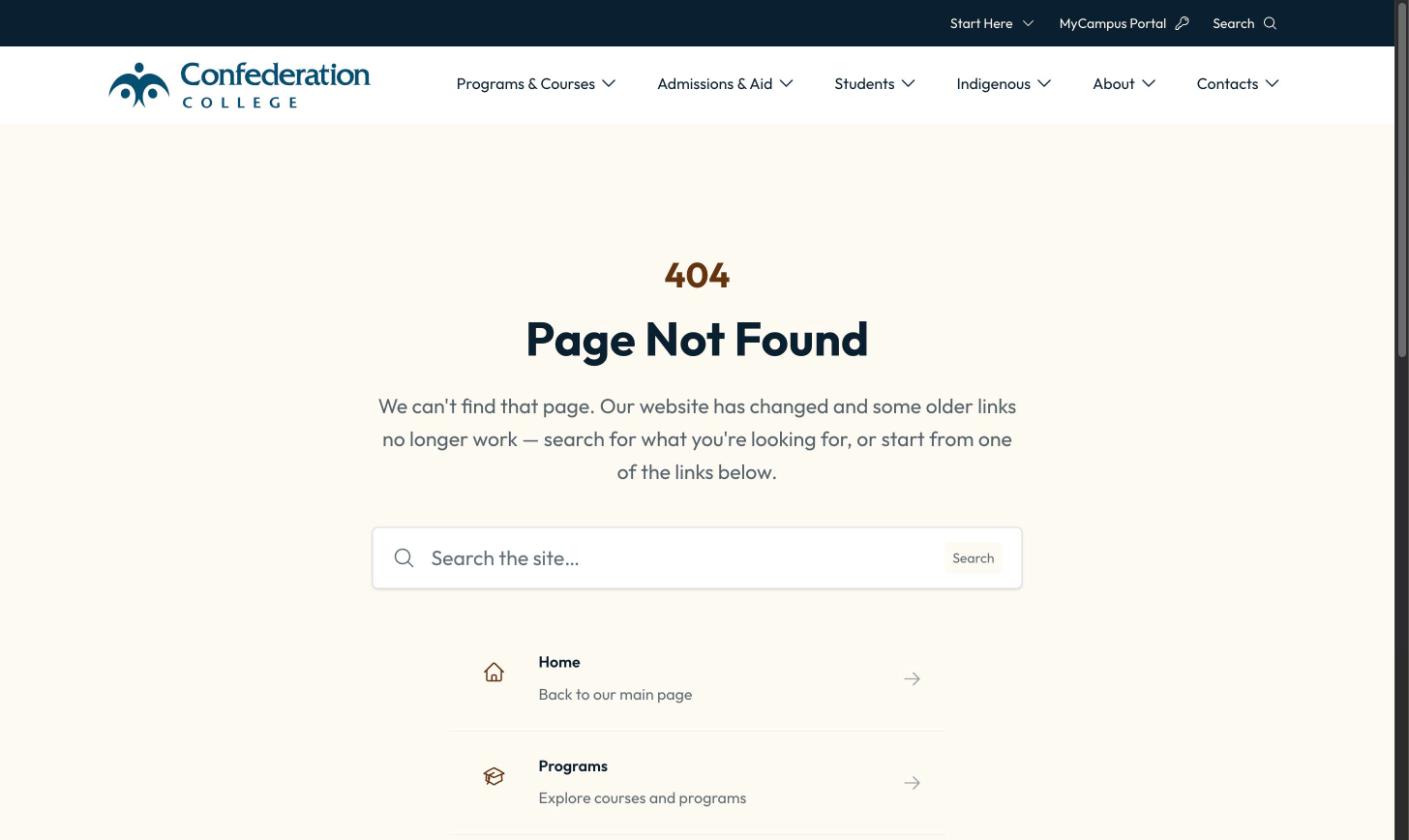
- Explain the site change without blame. The message tells visitors why an older link may no longer work, rather than suggesting they made a mistake. Familiar site navigation stays available.
- Offer useful ways forward. A prominent “Search the site…” control offers a route for visitors who know what they are looking for. Home, Programs, Admissions, About Us and Contact Us each have a short description, giving the choices more context than page names alone.
- Keep repairing old links. Every few days, GA4’s 404-page events are reviewed to find unresolved addresses that visitors are still trying to reach. Where a relevant replacement exists, a permanent redirect sends visitors directly to it. If there is no suitable replacement, a helpful 404 is preferable to an unrelated homepage redirect. For the tracking setup, see track 404s in GA4.
The large “404” and central search control are choices specific to this design, not requirements for every site. Consider whether an extra search control adds anything if the header already provides search. For other approaches to recovery, copy and visual design, see 404 page examples.
A browser check on 2026-10-10 received a 404 response; an automated request to the same address received a 403 security challenge instead. This illustrates why browser and automated checks can disagree. See how to check 404 errors for checking the response as well as the design.
Disclosure: the guide’s author built the college’s 404 page.
Our 404 page
This site’s own 404 page follows the same checklist. Open a made-up linkscan.app address to see it: a “Page not found” heading, one line on the likely cause, the site’s header and footer, links to the home page, the Testing Lab, the guides and the contact page, each with a short description, and a link to tell us which link brought you there. No search: the site is small and its header has none. The address answers 404, so a link checker reports that link as Broken, as it should. To track 404s in GA4 as this page does, see track 404s in GA4.
FAQ
Should I redirect 404s to the home page?
No. Google calls it “problematic” and says not to (Search Console Help), and the visitor loses the context of what they wanted. Redirect with a 301 only when a real replacement exists. To find which of your URLs return 404, see your own 404 pages.
404 or 410 for a page I deleted?
410 if it’s gone for good, 404 otherwise; both say the page isn’t there (RFC 9110). See what a 404 is for the difference.
Why does my 404 page return 200, or 403 to a checker?
A 200 usually comes from a catch-all rewrite in a single-page app, a CMS route that renders “not found” as a normal page, Apache’s ErrorDocument with a full URL (a redirect, then 200), or nginx’s error_page … =200. A 403 only to a checker is a bot wall; check the status in the browser, as in the case study.
Does my site need a custom 404 page if the host has one?
A default page sends the right code, but it is a dead end. A custom one gives visitors a way on and can say the site has changed.
Add to Chrome — free. Check a made-up URL and every link on your 404 page.